

Stop Spam in WordPress Comments & Sign-Up Forms

Quick Summary
- Layer defenses: Akismet for filtering, a honeypot field from WP Armour, and Google reCAPTCHA through the reCaptcha by BestWebSoft plugin.
- Remove the comment form's Website field with the comment_form_default_fields filter and convert comment HTML to plain text with htmlspecialchars().
- The comment functions are hooked to preprocess_comment and comment_text in functions.php, and trackbacks are turned off under Settings > Discussion.
To stop spam in WordPress comments and sign-up forms, layer a few defenses: a spam filter such as Akismet, a honeypot field and a CAPTCHA, then remove what spammers are after, namely the Website field, HTML in comments and trackbacks.
1. Install Akismet
Install Akismet and connect it with an API key. It checks each new comment and moves likely spam to the Spam folder. WPBeginner’s Akismet guide covers the setup.
2. Add a Honeypot to Stop Spambots
A honeypot is a form field hidden from people; bots that fill it in are rejected. Install WP Armour – Honeypot Anti Spam. Once it’s active, it adds a honeypot to the comment form and the registration form; there are no settings to change. WP Spam Fighter, which this step used to suggest, was closed on WordPress.org in September 2021 for a security issue, so replace it if you still have it installed.
3. Use a reCAPTCHA Plugin
The reCaptcha by BestWebSoft plugin (formerly Google Captcha) adds Google reCAPTCHA to WordPress forms, including the comment, registration and login forms, so bots can’t submit them.
4. Remove the Website Field From the Comment Form
Also, spammers often post comments just for the link in the Website field. Remove the field by unsetting its url entry with the comment_form_default_fields filter.
5. Disable HTML in Comments
Add this code to your theme’s functions.php to turn HTML in new comments into plain text with htmlspecialchars(), so links and tags show as typed.
    // This will occur when the comment is posted
    function plc_comment_post( $incoming_comment ) {

    // convert everything in a comment to display literally
    $incoming_comment['comment_content'] = htmlspecialchars($incoming_comment['comment_content'], ENT_COMPAT);

    // the one exception is single quotes, which cannot be #039; because WordPress marks it as spam
    $incoming_comment['comment_content'] = str_replace( "'", ''', $incoming_comment['comment_content'] );

    return( $incoming_comment );
    }

    // This will occur before a comment is displayed
    function plc_comment_display( $comment_to_display ) {

    // Put the single quotes back in
    $comment_to_display = str_replace( ''', "'", $comment_to_display );

    return $comment_to_display;
}

add_filter( 'preprocess_comment', 'plc_comment_post' );
add_filter( 'comment_text', 'plc_comment_display' );
remove_filter( 'comment_text', 'make_clickable', 9 );
The add_filter() calls at the end attach the two functions: plc_comment_post to preprocess_comment, which runs before a new comment is saved, and plc_comment_display to comment_text, which runs when a comment is shown.
ENT_COMPATtellshtmlspecialchars()to leave single quotes alone, as it did by default before PHP 8.1, so the next line can swap them as the code comment says.- WordPress turns web addresses in comment text into links with its
make_clickablefilter, even inside the escaped HTML. Theremove_filter()line switches that off, so a pasted link shows as plain text.
6. Disable Trackbacks
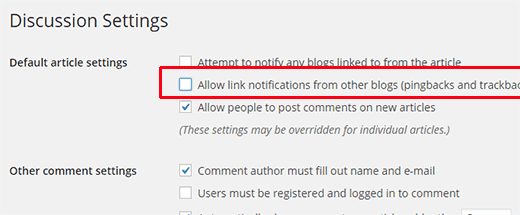
Trackbacks and pingbacks, notifications from blogs that link to you, are a common spam channel. For the whole blog, uncheck Allow link notifications from other blogs (pingbacks and trackbacks) on new posts under Settings > Discussion:
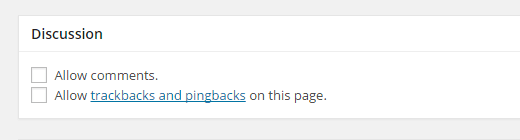
Likewise, for a single post, turn them off in the post’s Discussion settings:
Related articles
- basic WordPress security hardening: login limits, file editing and other server rules
- sanitizing form input in PHP: more on htmlspecialchars() and filtering user input

