

Hide Some Product Categories With Custom Query Using ACF

Quick Summary
- Add an ACF True / False field to product categories, then list them with get_terms() and a meta_query that returns only ticked categories.
- Name the field v_display or change it in the query; unticked categories, including ones never saved with the field, stay hidden.
- Setting hide_empty to 0 lets a ticked category appear even when it has no products assigned to it.
To hide some WooCommerce product categories from a custom category list, add an Advanced Custom Fields (ACF) True / False field to product categories. Then list the categories with get_terms() and a meta_query that returns only the categories where the field is ticked, so every unticked category stays hidden.
Step 1: list the product categories
This is a simple get_terms() query that lists your product categories, sorted by name. To show each category’s image as well, see the same category list with thumbnail images. The queries in steps 1 and 3 pass the taxonomy as the first argument; that still works, but since WordPress 4.5 the documented form is 'taxonomy' => 'product_cat' inside the arguments array.
Step 2: add a True / False field to product categories
In ACF, create a True / False field and assign its field group to the product category taxonomy. The query in step 3 reads a field named v_display, so use that name or change it in the query:
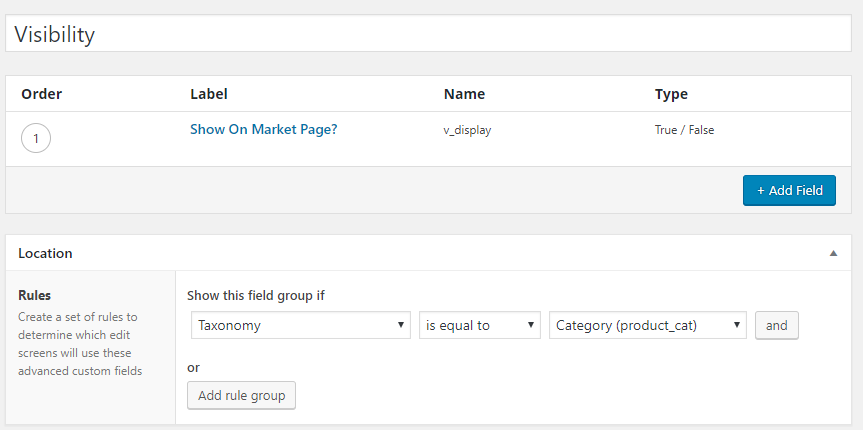
The field then appears when you add a new product category, as in the image below. It is also available on existing product categories: open a category with Edit to find it.

Step 3: query only the categories set to display
The custom query adds a meta_query to get_terms() that returns only categories whose v_display field is 1 (ticked). Any category left unticked, including one that has never been saved with the field, is hidden. The query also sets hide_empty to 0, so a ticked category shows even when it has no products.
If your shop needs custom category queries or ACF fields like this, see my WooCommerce development services.
Related articles
- reading an ACF field from a taxonomy term: print a category field’s value instead of filtering by it
- choosing the size of category thumbnails: the next tweak to the same category list
